Web Based (http, port 80) Whois in Domain Punch Pro and Watch My Domains Pro / ISP
Do Whois Lookups from a Web Server
You can make Domain Punch Pro, Watch My Domains and Domain Name Analyzer Pro obtain whois data from a web based script hosted on your web server instead of doing it directly from your computer.
Why Would You Want to Do this?
If you have a special agreement with any registrar for access to their whois API, you can create your own (PHP/Python/any other) whois script and upload it to your server. Then use that script instead of accessing the port 43 whois server.
Another reason is that companies often have firewall policies that exclude port 43. If you are behind such a firewall, you can use a PHP/Python/Perl script on an external server to do whois lookups and access the script over standard http.
A third reason is that your IP address may be blocked at a registrar and you may not be able to do whois lookups at all. In such cases you can do the whos lookup from a different location and then get the whois data into the software.
What You Need
- A web server script for doing whois lookup. You can find a free PHP script for this below. This has to be uploaded to a web server. Make sure that the outbound IP of the web server is not blocked by the whois server. You can use any low-cost shared hosting or VPS account for this.
- A configuration change in Domain Punch Pro or Watch My Domains instructing the software to use the remote script instead of doing a direct port 43 whois.
PHP Script for Doing Whois Lookups
Here is a simple PHP script for doing whois lookups.You can download it from the link below.
Download the ZIP file and unzip it. Upload the whois.php file to your web server so that
it is accessible from a browser.
Check if the whois script works by executing it from a web browser's address bar. For example,
http://server.com/whois.php?domain=abcd.com&server=whois.crcnic.net
http://server.com/whois.php?domain=watch.com&server=whois.godaddy.com
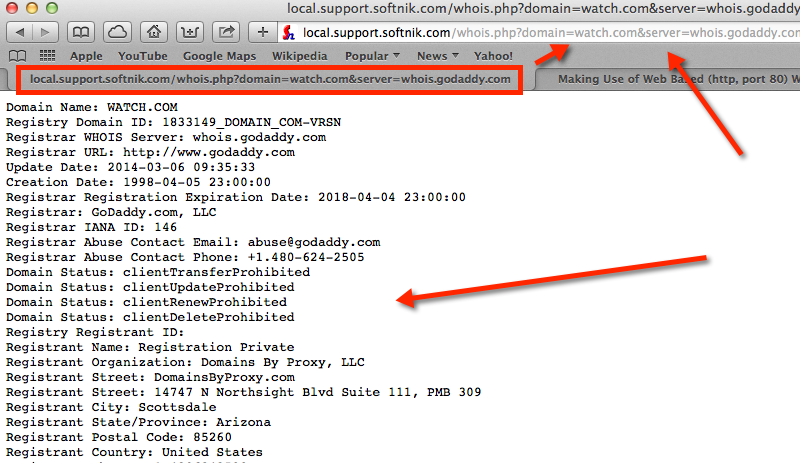
In the example screen shot above, the script is at
http://local.support.softnik.com/whois.php
Please change the URL and path as required when testing from your browser.
Try different domain names and whois servers to check if the script is working properly and that the server IP address is not blocked.
How to define http based proxy for a specific whois server.
If you are going to use the proxy script for a country code domain or for TLDs that use the
thick whois model, you should right click on the domain and select Whois Setup >
Basic Whois Settings from the context menu.
To specify a proxy setting for a registrar whois server or for domains that use the thin
whois model (COM, NET, TV, etc), right click on the domain that uses
the specific registrar and select Whois Setup > Advanced Whois Settings from the context menu.
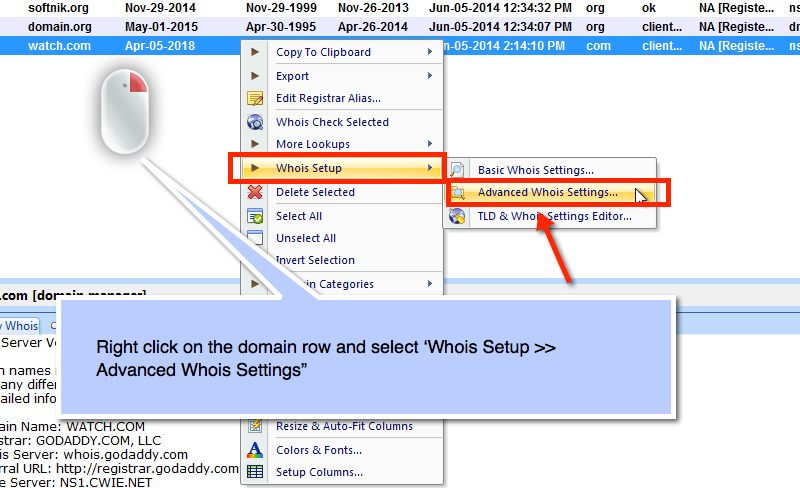
The whois server setting dialog has an option to specify an alternate http based proxy. If this entry is set, the software will use it instead of doing a port 43 whois lookup.
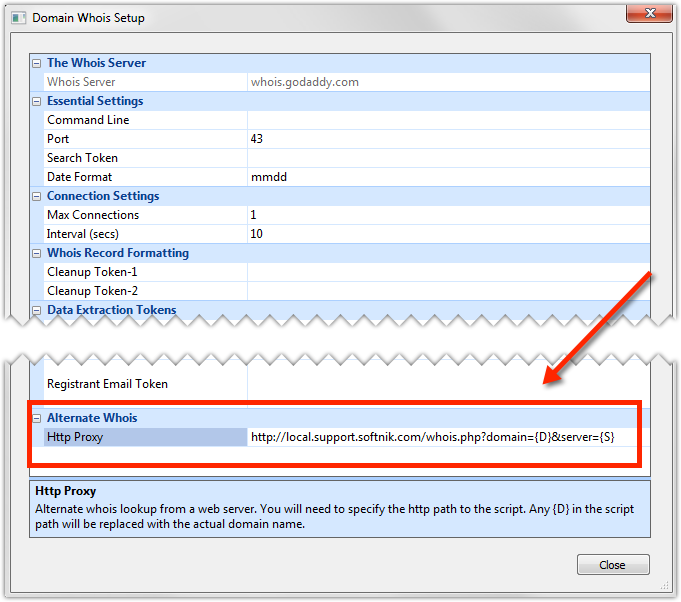
The http proxy is specified as the full path to the script with the domain and server parameters
set to {D} and {S} respectively. Remember to leave all the other the settings for
the whois server as it is. The proxy entry should be...
http://server.com/whois.php?domain={D}&server={S}
Replace the http://server.com/whois.php with the actual path to your script.
Please remember to specify appropriate lookup intervals and connection counts in the software (Watch My Domains / Domain Punch Pro). If you do not obey the registrar whois lookup terms and conditions your IP will get banned and you will have difficulty doing lookups.
Please also See