Manually editing data columns
The lower panel in Watch My Domains Pro / ISP, Domain punch Pro and other products contain different views in a tabbed interface. One of them is called details / edit and displays all the extracted data for the currently selected domain. You can manually edit the data in the details window.
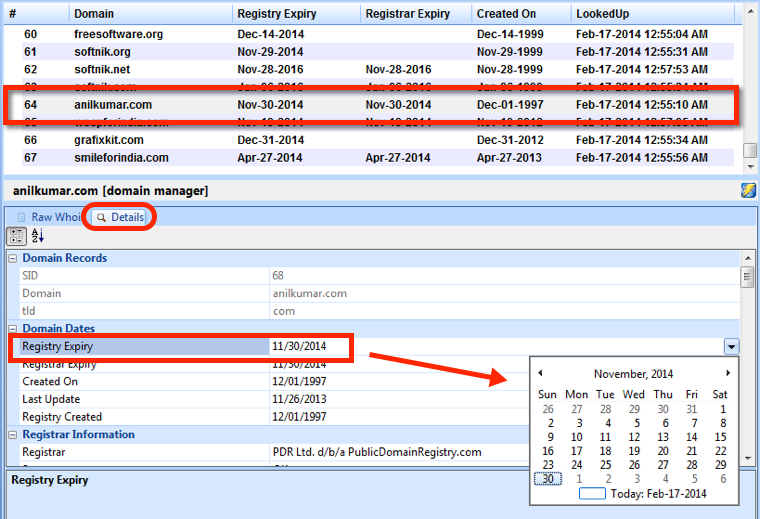
If you edit a record using the Details View and then run a domain whois lookup your edited data may be lost (only the fields that are updated by WMD/ISP will be lost). To prevent this from happening, the software will automatically write-protect any domain that has been modified manually (you can change this behaviour from the "Application Settings" option).
Setting the "write-protect" will disable WMD from looking up that domain, so it will be better to do a lookup first and then use "Details View" to edit and lock.
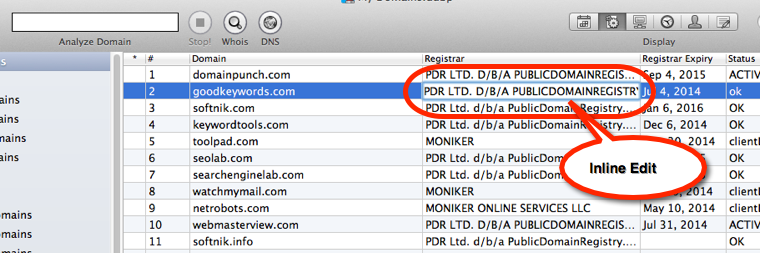
There is no details tab in the Mac version. However, you can edit the columns inline (click on the entry in the table).
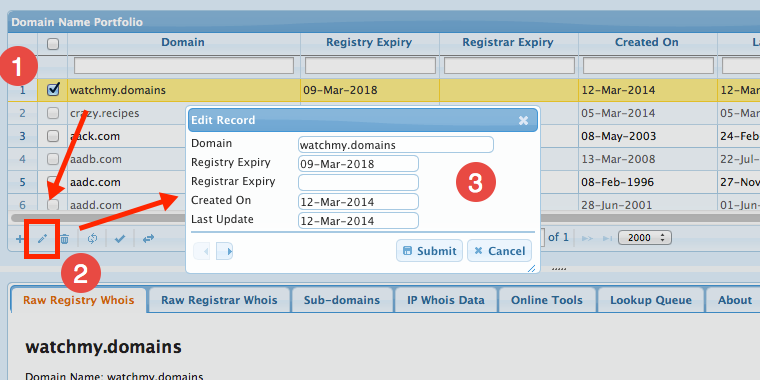
In the server edition, you can select the domain in the domain table and then click the 'Edit' button in the bottom toolbar. You can edit only the columns that are currently visible, so you will need to invoke the editor again after switching to a different display group.