New Database Project - Watch My Domains ISP
Database Selection
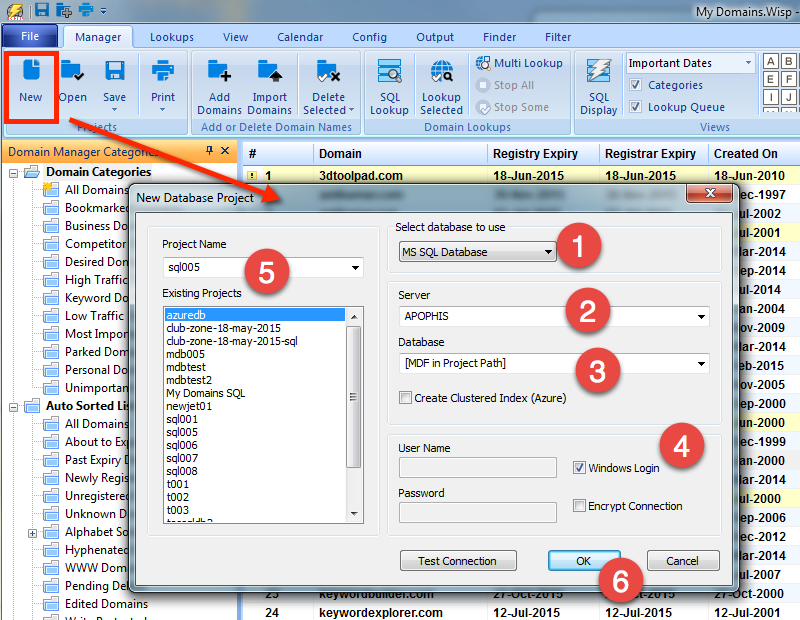
Watch My Domains ISP supports both Microsoft Jet (Access) database and SQL Server database. You can select the type of database from the "New" project dialog. Please see the screen shot below.
Microsoft Jet database doesn't require any additional installations and will work on all Windows XP, Vista and 7 systems.
Using MS SQL Database
MS SQL database may be used if the MS SQL server is installed and is accessible from the system. You should first select "MS SQL Database" in the drop-down list and then specify the server path, a pre-existing database name and access parameters (username, password etc.)
You can also ask the software to create the MDF file in the project path by selecting "[MDF in project path]". This is useful if you wish to keep the domain database files within the project directory for easy backup. See Project as MDF in Project Path for more details. Please note that you will need to attach the MDF file to a database using the MS-SQL server tools if you move the MDF file to another location.
ODBC Error Logs
The ODBC errors are logged to %APPDATA%/Watch My Domains ISP v5/odbcerror.log.