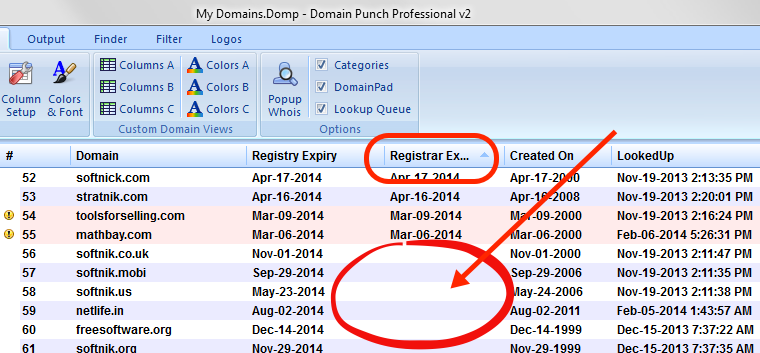
Why is the Registrar Expiry Date Column Empty?
The registrar expiry date column will be empty for most country code domains and TLDs. This is because most whois databases use the "thick model".
Thick and Thin Models
The whois databases are operated based on a thick model or a thin model. In the thick model, one whois server provides all the data corresponding to the domains. This model is used by ORG, BIZ, INFO, etc.
In the thin model there are two whois servers. The first whois server (at the registry) provides only the basic details regarding a domain. It then points to the actual whois server that can provide full authoritative information. The second whois server (maintained by the registrar) has to be queried to get all the relevant data.
The thin model is used by .com , .net and some other registries. So, for these domains there are two different whois queries. Hence there are two different expiry dates too. In 99% of the cases these two expiry dates will be the same (or differ by just one day). However, in some cases this will be different.
Different expiry dates may mean that the registrant has not renewed the domain (the registrar may be keeping the domain on hold) or that there is a problem. For your own domains, you should contact the registrar to fix any discrepancies.
Blank Registrar Expiry Column
For registries that use the thick model (org, biz, info, etc.) and for most ccTLDs (country code TLDs), the software will only display the registry expiry dates. The registrar expiry column will be blank. Some ccTLDs do use the thin model (example: TV).
For registries that use the thin model, the software will display expiry dates corresponding to the two whois servers. These are labeled registry expiry and registrar expiry.