Quick Domain Filtering & Display in Watch My Domains ISP & Domain Name Analyzer Pro
Watch My Domains ISP & Domain Name Analyzer Pro can use SQL queries to quickly display the domains that interest you. For example, you can just type in
soft|comp+.com
to find and list all .COM domains in your database that contain either "soft" or "comp" (like softnik.com, computer.com, freesoftware.com, company.com, etc.) in them.
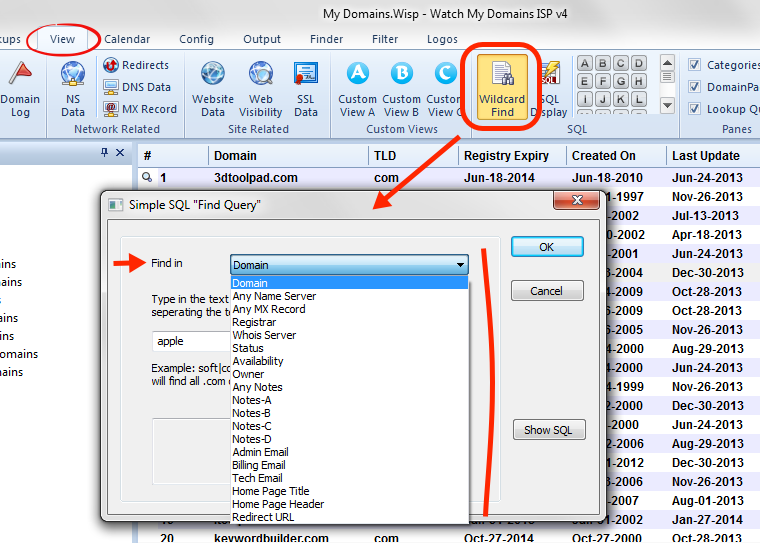
You can also search within other fields like name servers, owner name, etc.
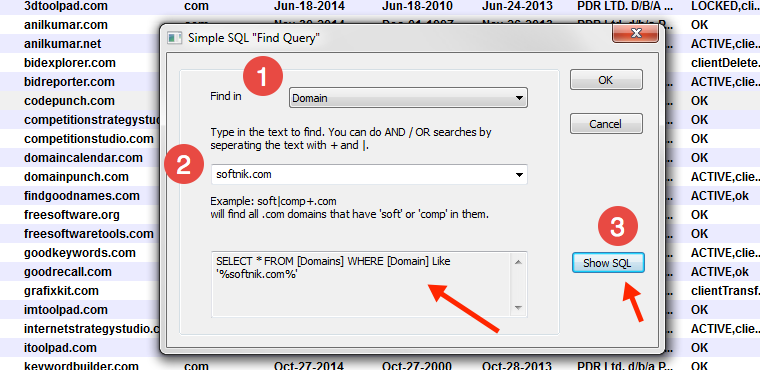
Press Ctrl-F while in the Domain Manager tab of Watch My Domains ISP / Domain Name Analyzer Pro to open the "Simple SQL Find Query" dialog (see screen shot).
You can optionally examine the actual SQL query that is generated to find the domains. This will help you learn basic SQL query structure.